






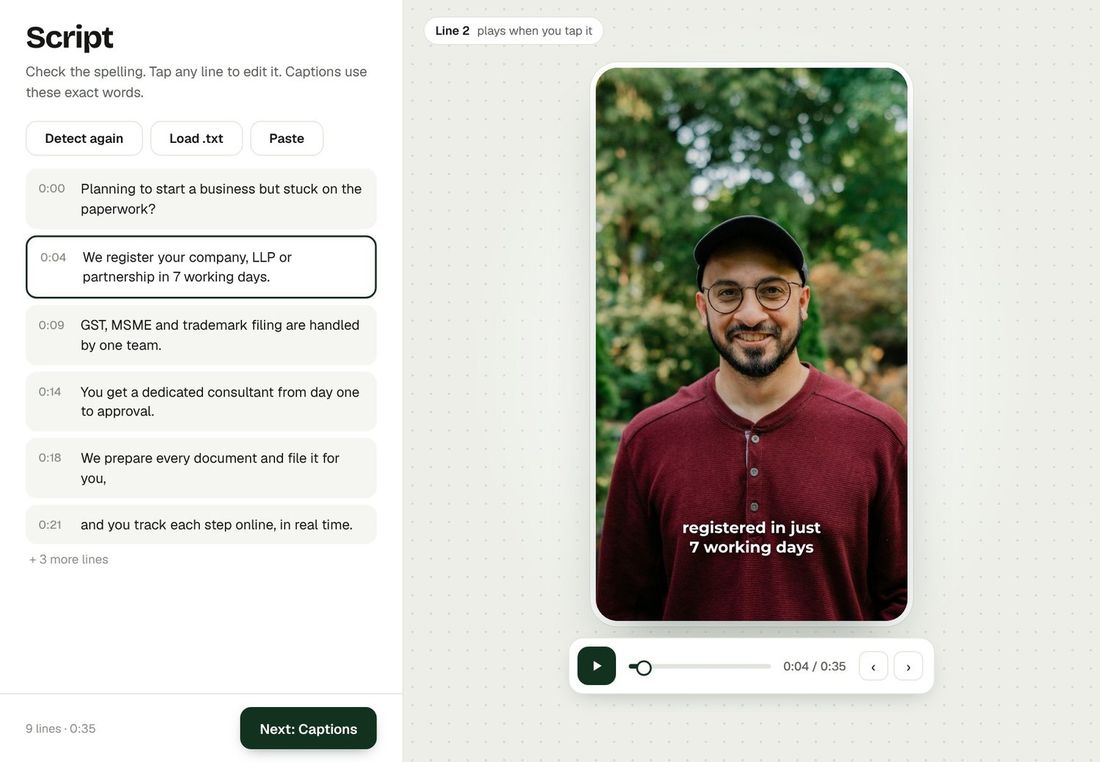
Captions are only as good as the words behind them. Normally you paste or upload your script. With Auto-detect, Bespoke writes the script from your video's speech, and you simply check it.
How it works
- Upload your video on the Quick Mode screen.
- Pick the spoken language: Hindi / Hinglish or English.
- Press Auto-detect in the Script box. In about 10–30 seconds the words appear in the box.
- Read it once and fix any word, then press Create Magic. Your captions are made from this text, so a quick check makes them word-perfect.
What you get
- Hinglish in Roman letters (for example "Aaj hum baat karenge…"), the way captions are usually written, or clean English.
- Proper sentences with full stops and capital letters.
- No filler words like "um" and "uh", and no repeated stutters.
- If your script box already has text, Bespoke asks before replacing it.
Good to know
- Speech recognition is very accurate but never perfect, so always read the detected text once before you create.
- Only the sound of your video is sent for recognition, not the picture.
- Works for videos up to 12 minutes long.
Make your first video with Bespoke
Upload a clip from your phone and get a finished reel with captions, B-roll and clean sound. Your first 2 videos are free, no card needed.